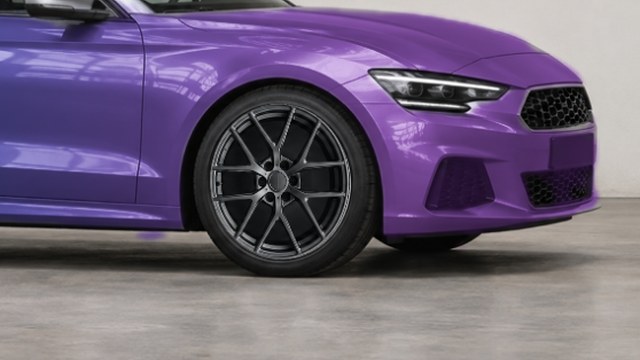
Align before comparing
Choose a side or three-quarter photo with both wheels visible. Align each wheel center before checking its edges.
Perspective can make the front and rear wheels appear different sizes. Adjust each against the original photo.
Look beyond the spokes
Keep the body color unchanged while comparing spoke patterns, brightness, and their relationship with the wheel arches.
After inspecting details, return to the full car view. Decide whether the wheels complement the overall style.
Verify fitment separately
A preview does not check PCD, ET offset, center bore, brake clearance, or installation suitability.
Scaling an image does not establish a wheel diameter in inches. Have vehicle and wheel specifications checked before installation.
How to get started
Choose your photo
Import a clear vehicle photo in the iPhone app.
Position each wheel
Adjust front and rear wheel centers and visual size separately.
Keep the style
Save your preferred combination and verify actual fitment separately.
Before you make it yours.
Does a good preview mean it fits?
No. Appearance alone cannot verify dimensions, bolt pattern, offset, or clearance.
Why do the wheels look uneven?
Check centers, proportions, and perspective. Obstruction or an extreme camera angle may call for a different photo.
Is CarRim free to use?
Free to download and use. The free service is supported by ads, and some exports may require watching a rewarded ad; ad removal is an optional purchase. Check the App Store for version 3.0 download availability.